IN-CAD 3D Space · jetzt verfügbar

Ihr Metallbau-Modell beim Kunden — im Browser, auf dem Smartphone, in Originalgröße.

Öffnen Sie das IN-CAD-Modell, prüfen Sie Maße und Oberfläche, markieren Sie offene Punkte und senden Sie dem Bauherrn einen Link zur Freigabe. Keine Installation, keine CAD-Lizenz beim Betrachter.

Windows, macOS, iOS, Android Nur Lesen für Empfänger Link widerrufbar
So funktioniert es

Drei Schritte vom Modell zum Freigabe-Link.

Für Metallbau-Betriebe, die IN-CAD nutzen — und für alle im Projekt ohne CAD-Lizenz: Vertrieb, Projektleitung, Kalkulation, Montage und Bauherr. Kein Extra-Export, keine Software beim Empfänger.

Anmelden

Auf 3D Space öffnen klicken und mit E-Mail anmelden. Sie erhalten einen Einmalcode — kein Passwort, nichts zu installieren.

Prüfen & markieren

Projekt anlegen, IN-CAD-Modell ablegen — die Ansicht erscheint automatisch. RAL-Oberfläche wählen oder offene Punkte am Modell markieren.

Freigabe holen

Auf Teilen klicken und den Link senden. Der Empfänger öffnet ihn im Browser, ohne Anmeldung — auf dem Smartphone auch vor Ort in Originalgröße.

So nutzen es Betriebe

Für den Moment zwischen „hier ist der Entwurf“ und „ja, bauen Sie es“.

Typische Situationen im Metallbau — wo diejenigen, die das Modell sehen müssen, oft keine CAD-Lizenz haben.

Außendienst · beim Kunden

Oberfläche vor Ort freigeben lassen

Modell in 3D Space öffnen, die gewünschte RAL-Oberfläche wählen, Link senden. Der Kunde öffnet ihn auf dem Smartphone, sieht das Modell in der eigenen Umgebung und gibt die Farbe frei.

“Keine PDF-Renderings mehr. Der Kunde sieht sein Tor in der eigenen Einfahrt.”

Projektleitung · im Büro

Klärungen am Modell festhalten

Markierungen an die Stellen setzen, die Aufmerksamkeit brauchen — falsche Öffnung, Oberflächenfrage, Glas — und die Werkstatt sieht genau wo. Die Markierungen sitzen am 3D-Punkt, nicht auf einem Screenshot.

“Keine roten Kreise mehr in PowerPoint. Der Hinweis sitzt am Modell.”

Arbeitsvorbereitung · ohne CAD-Lizenz

Maße prüfen und Angebot schreiben

Modell im Browser öffnen, Abmessungen und Variablen lesen, Angebot erstellen. Kein Warten auf einen freien Konstrukteur, keine Lizenz-Blockierung.

“Ich kalkuliere den Auftrag, ohne dass jemand CAD für mich öffnen muss.”

Montage · auf der Baustelle

Passform vor Ort prüfen

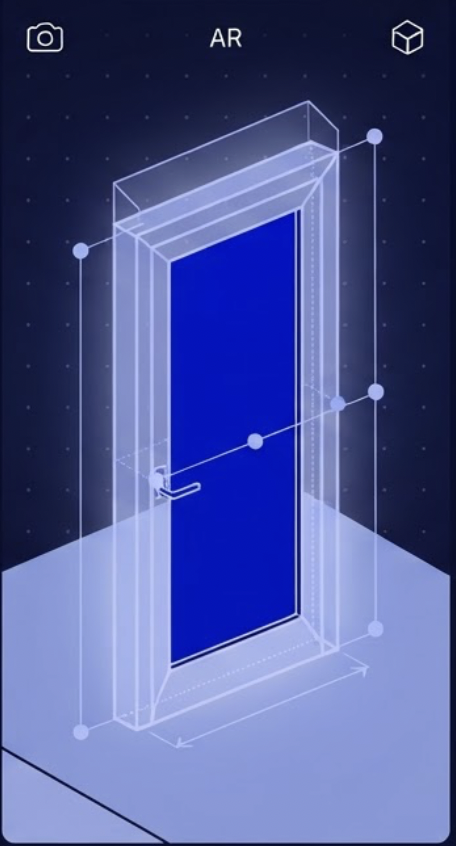
Ein geteilter Link öffnet sich in jedem Smartphone-Browser. Auf unterstützten Geräten steht das Modell in Originalgröße im Raum — Durchgang, Höhe und Lage an der Wand prüfen, bevor das Teil kommt.

“Im Treppenhaus gesehen: passt nicht durch die Tür. Eine Anfahrt gespart.”
Was Sie tun können

Alles Wichtige für Freigabe und Abstimmung — in einem Browser-Tab.

Vier Dinge, die Sie sofort nach der Anmeldung nutzen. Keine CAD-Lizenz am Rechner, keine Software-Installation beim Empfänger.

Modell ohne CAD-Rechner öffnen

Datei per Drag-and-drop ablegen oder aus einem Projekt wählen. Das Modell wird online aufbereitet und in Ihrem Browser angezeigt — Sie und Ihr Kunde brauchen kein IN-CAD installiert.

RAL und Edelstahl vor der Freigabe zeigen

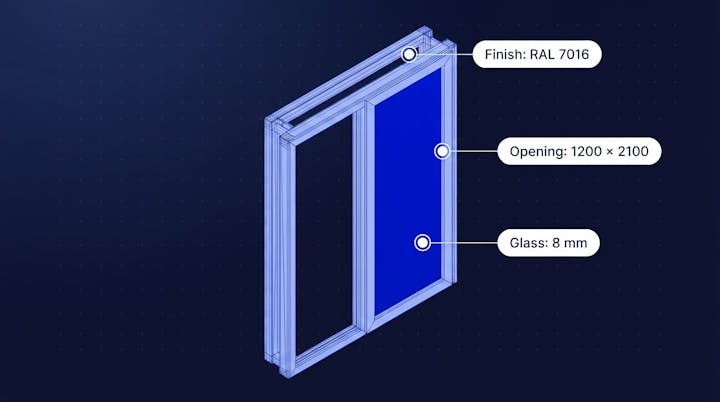
RAL 7016 / 9005 / 9016 / 9006 / 9007 oder Edelstahl in Echtzeit auf das Modell legen. Kein Neu-Export aus CAD — der Kunde sieht das Aussehen, bevor er freigibt.

Offene Punkte am Modell markieren

Auf das Modell klicken und eine Markierung mit Kommentar hinterlassen — Oberfläche, Öffnung, Maß, Glas, Problem oder Notiz. Die Markierung bleibt am 3D-Punkt, auch beim Drehen und Zoomen.

Link an Bauherrn und Montage schicken

Einen schreibgeschützten Link senden — Ansicht ohne Anmeldung. Auf unterstützten Smartphones steht das Modell in Originalgröße im Raum. Links verfallen und lassen sich jederzeit widerrufen.

Überall verfügbar

Vom Bildschirm in die Tasche Ihres Kunden — ein Link.

Dasselbe Modell, das sich in Ihrem Browser öffnet, öffnet sich auf dem Smartphone Ihres Kunden. Keine App, kein Plugin. Auf unterstützten Geräten steht das Modell in Originalgröße im Raum.

  • Funktioniert auf Windows, macOS, iOS und Android
  • Vor Ort in Originalgröße auf dem Smartphone
  • Nur Lesen für Empfänger — kein Bearbeiten möglich
  • Links verfallen automatisch und sind jederzeit widerrufbar
  • Daten getrennt je Firma — ein Kunde sieht nie die Daten eines anderen
  • Verfügbar in Deutsch und Englisch
IN-CAD 3D Space · now available

Your metalwork model with the customer — in the browser, on the phone, at real scale.

Open the IN-CAD model, check dimensions and finish, mark open points, and send the client a link for approval. No install, no CAD license on the viewer’s side.

Windows, macOS, iOS, Android Read-only for recipients Links revocable
How it works

Three steps from model to approval link.

Built for metal fabrication shops that use IN-CAD — and for everyone on the job without a CAD license: sales, project leads, estimators, installers and clients. No extra export, no software for the recipient.

Sign in

Click Open 3D Space and sign in with your email. You get a one-time code — no password, nothing to install.

Review & mark

Create a project, drop in an IN-CAD model — the view appears automatically. Pick a RAL finish or mark open points on the model.

Get approval

Hit Share and send the link. Recipients open it in the browser with no sign-in — on a phone, at real scale on site when supported.

How shops use it

Built for the moment between “here is the design” and “yes, build it”.

Typical situations in metal fabrication — where the people who need to see the model often do not hold a CAD license.

Field sales · at the client

Get the finish approved on site

Open the model in 3D Space, pick the RAL finish, send the link. The client opens it on their phone, sees the model in their own space, and approves the colour.

“No more render PDFs. The client sees their gate in their own driveway.”

Project lead · in the office

Capture open points on the model

Mark the spots that need attention — wrong opening, finish question, glass — and the workshop sees exactly where. Markers sit on the 3D point, not on a screenshot.

“No more red circles in PowerPoint. The note is on the model.”

Estimating · no CAD license

Check dimensions and write the quote

Open the model in the browser, read dimensions and variables, write the quote. No waiting for a free designer, no license checkout.

“I price the job without anyone opening CAD for me.”

Installation · on site

Check fit before the part arrives

A shared link opens in any phone browser. On supported devices the model stands at full size in the room — check clearance, height and position against the wall before delivery.

“In the stairwell I saw it would not fit through the door. Saved a return trip.”

What you can do

What you need for review and approval — in one browser tab.

Four things you can use the moment you sign in. No CAD license on your machine, no software for the recipient.

Open a model without a CAD workstation

Drag a file in or pick from a project. The model is prepared online and shown in your browser — you and your client do not need IN-CAD installed.

Show RAL and stainless before approval

Apply RAL 7016 / 9005 / 9016 / 9006 / 9007 or stainless to the model in real time. No re-export from CAD — the client sees the look before they approve.

Mark open points on the model

Click the model and leave a marker with a comment — finish, opening, dimension, glass, issue or note. The marker stays on the 3D point through orbit and zoom.

Send a link to client and site crew

Share a read-only link — no sign-in to view. On supported phones the model stands at real scale in the room. Links expire and can be revoked at any time.

Available anywhere

From your screen to your customer’s pocket — one link.

The same model that opens in your browser opens on your customer’s phone. No app, no plugin. On supported devices the model stands at real scale in the room.

  • Works on Windows, macOS, iOS and Android
  • On site at real scale on the phone
  • Read-only for recipients — no editing
  • Links expire automatically and can be revoked anytime
  • Data separated by company — one client never sees another’s
  • Available in English and German